Finance Database MCP Server
Ask an AI assistant for every large European semiconductor company and you will usually get a list. Whether it is complete depends on what the model remembers, and the tickers it gives may be the US over-the-counter lines rather than the shares on Euronext or Xetra. Ask for the bond ETFs of an issuer and you get the famous ones, not all of them.
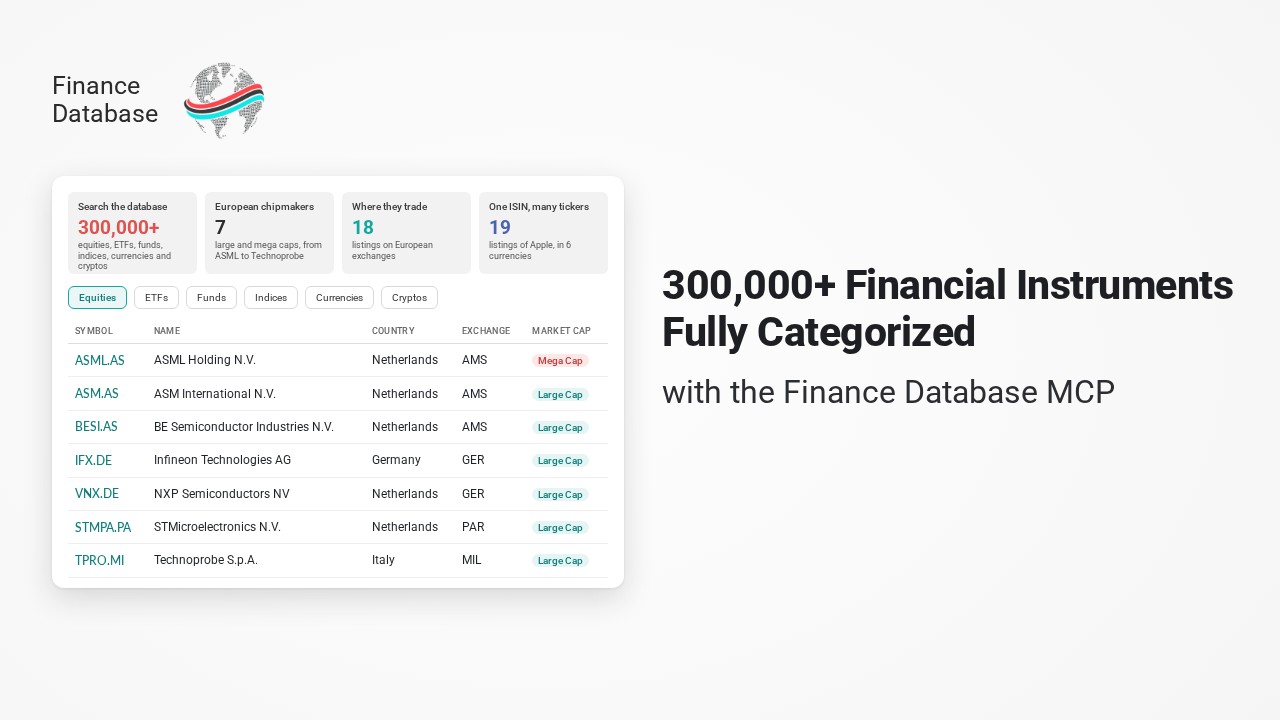
The Finance Database MCP server gives the assistant the database instead of its memory. It is an open-source Model Context Protocol (MCP) server that connects Claude, ChatGPT, GitHub Copilot, Cursor, Gemini and other assistants to the Finance Database: 300,000+ equities, ETFs, funds, indices, currencies, cryptocurrencies and money markets, each categorized by sector, industry, country, exchange, market cap, issuer or category. Ask in plain English and the assistant filters the database on your behalf.
Why the Finance Database MCP
Language models are good at reasoning about companies and poor at listing them. A list from memory misses smaller names, mixes up share classes and listings, and stops at whatever the training data happened to contain. A web search finds articles about companies, not a complete universe you can filter.
| The model's memory | Finance Database MCP | |
|---|---|---|
| Where the list comes from | Whatever the model remembers | 300,000+ categorized symbols |
| Completeness | The well-known names | Every match, with the total count |
| Tickers | Often one listing, not always the right one | Every listing, with exchange and currency |
| Identifiers | Guessed | Search by ISIN, CUSIP or FIGI |
| Same question, two chats | Two different lists | The same list |
The Finance Database holds classifications, not prices or financial statements. That makes it the natural first step of an analysis: find the universe here, then pass the tickers to the Finance Toolkit MCP server for their financial statements, ratios, valuation and risk.
What You Can Ask
You never have to name a tool or a filter value: ask in plain English and the assistant looks up the valid options and picks the right tool. A few examples of what that covers:
Screen companies
"Which Dutch financial companies are Large or Mega Cap?"
equities by country, sector, industry, exchange and market capFind a symbol
"Which ticker belongs to ISIN US0378331005, and where is it listed?"
search by ticker, name, ISIN, CUSIP or FIGIETFs and funds
"What bond ETFs does Vanguard list in the US?"
by category, issuer, currency and exchangeListings and exchanges
"On which European exchanges do the large chipmakers trade?"
exchanges, market identifier codes, primary listingsIndices, currencies and crypto
"Which currency pairs quote against the Swiss franc?"
indices, currency pairs, cryptocurrencies, money marketsExplore the categories
"Which industries are there in the Health Care sector?"
every valid value of a filter, narrowed by other filtersThe example conversations below show what that looks like for four questions, with the real results.
Installation
Pick the remote server if you want to get going without installing anything, or the local server if you prefer to run the process yourself. Neither needs an API key.
Remote Server
Point your client at the URL below. There is no sign-in step: the tools are available as soon as the connector is added.
https://financedatabase.jeroenbouma.com/mcp
Pick your client below for the exact steps; most clients accept the URL through their settings or with a single command. The privacy policy describes what the hosted server processes.
Claude Desktop
- Open Claude Desktop and click on Customize.
- Go to the Connectors tab, click on the “+” button and select Add custom connector.
- Enter a name, e.g. Finance Database, and paste the URL:
https://financedatabase.jeroenbouma.com/mcp - Click “Add” and the Finance Database tools are available in your conversations.
Claude.ai
- Open claude.ai and click on Customize in the left sidebar.
- Go to the Connectors tab, click on the “+” button and select Add custom connector.
- Enter a name, e.g. Finance Database, and paste the URL:
https://financedatabase.jeroenbouma.com/mcp - Click “Add” and the Finance Database tools are available in your conversations.
Claude Code
- Run the following command once in your terminal:
claude mcp add --transport http finance-database https://financedatabase.jeroenbouma.com/mcp - Restart Claude Code and the Finance Database tools appear automatically.
ChatGPT
ChatGPT connects to custom MCP servers through Developer mode (available on paid ChatGPT plans):
- Open Settings → Apps & Connectors → Advanced settings and enable Developer mode.
- Back in Apps & Connectors, click Create and enter a name, e.g. Finance Database, and the MCP server URL:
https://financedatabase.jeroenbouma.com/mcp - Select No authentication and click Create.
- In a new chat, open the + menu, enable the Finance Database connector under Developer mode and start asking questions.
Codex CLI
- Run the following command once in your terminal:
codex mcp add finance-database --url https://financedatabase.jeroenbouma.com/mcp - Start
codexand the Finance Database tools are available in every session.
VS Code and GitHub Copilot
- Open the Command Palette (
Cmd+Shift+P/Ctrl+Shift+P) and run MCP: Add Server. - Select HTTP as the server type.
- Enter the URL
https://financedatabase.jeroenbouma.com/mcpand name it finance-database. - VS Code writes the entry to
.vscode/mcp.json(or your user profile) automatically and the tools show up in Copilot’s Agent mode.
Cursor
- Open Cursor Settings (
Cmd+,/Ctrl+,) and navigate to Features → MCP Servers. - Click + Add new MCP server.
- Set the type to http and paste the URL:
https://financedatabase.jeroenbouma.com/mcp - Name it finance-database and click Save.
Windsurf
- Open Windsurf Settings and navigate to MCP Servers.
- Click Add Server and select Remote / HTTP.
- Paste the URL
https://financedatabase.jeroenbouma.com/mcpand name it finance-database. - Click Save and reload the window.
Gemini CLI
- Run the following command once in your terminal:
gemini mcp add --transport http finance-database https://financedatabase.jeroenbouma.com/mcpAlternatively, add the entry to
~/.gemini/settings.jsonby hand:{ "mcpServers": { "finance-database": { "httpUrl": "https://financedatabase.jeroenbouma.com/mcp" } } } - Start
geminiand run/mcpto confirm the server is connected.
Local Clients
The local server runs on your own machine through uvx and works with every client that supports the stdio transport. The setup wizard finds the config file of Claude Desktop, Claude Code, VS Code, Cursor, Gemini CLI or Windsurf and writes the entry for you:
uvx --from "financedatabase[mcp]" financedatabase-mcp-setup
If you prefer to do it by hand, pick your client below and add the snippet to its config file. The database is downloaded on first use, cached on your machine and checked for updates at most once a day, exactly like the Python package.
Claude Desktop
Easiest installation is via the MCPB bundle, which handles configuration automatically. Download the Finance Database MCPB bundle, double-click it and click Install in Claude Desktop.
Alternatively, edit claude_desktop_config.json and add the entry inside mcpServers:
- macOS:
~/Library/Application Support/Claude/ - Windows:
%APPDATA%\Claude\ - Linux:
~/.config/claude/
  {
    "mcpServers": {
      "finance-database": {
        "command": "uvx",
        "args": ["--from", "financedatabase[mcp]", "financedatabase-mcp"]
      }
    }
  }
Claude.ai
Claude.ai runs in the browser and cannot start a process on your machine, so it only connects to servers over HTTP. Use the remote server instead, or host the server yourself behind a public URL.
Claude Code
Run the following command once in your terminal:
claude mcp add finance-database -- uvx --from "financedatabase[mcp]" financedatabase-mcp
Or edit ~/.claude.json (create it if needed) and merge the entry inside mcpServers:
  {
    "mcpServers": {
      "finance-database": {
        "command": "uvx",
        "args": ["--from", "financedatabase[mcp]", "financedatabase-mcp"]
      }
    }
  }
ChatGPT
ChatGPT only connects to MCP servers over HTTP and cannot start a local process. Use the remote server instead, or host the server yourself behind a public URL.
Codex CLI
Run the following command once in your terminal:
codex mcp add finance-database -- uvx --from "financedatabase[mcp]" financedatabase-mcp
Or add the entry to ~/.codex/config.toml:
  [mcp_servers.finance-database]
  command = "uvx"
  args = ["--from", "financedatabase[mcp]", "financedatabase-mcp"]
VS Code and GitHub Copilot
Create or edit .vscode/mcp.json in your workspace root. VS Code uses servers as the top-level key (not mcpServers):
  {
    "servers": {
      "finance-database": {
        "command": "uvx",
        "args": ["--from", "financedatabase[mcp]", "financedatabase-mcp"]
      }
    }
  }
Cursor
Create or edit .cursor/mcp.json in your project (or ~/.cursor/mcp.json for all projects):
  {
    "mcpServers": {
      "finance-database": {
        "command": "uvx",
        "args": ["--from", "financedatabase[mcp]", "financedatabase-mcp"]
      }
    }
  }
Windsurf
Edit ~/.codeium/windsurf/mcp_config.json (create it if needed):
  {
    "mcpServers": {
      "finance-database": {
        "command": "uvx",
        "args": ["--from", "financedatabase[mcp]", "financedatabase-mcp"]
      }
    }
  }
Gemini CLI
Edit ~/.gemini/settings.json (create it if needed):
  {
    "mcpServers": {
      "finance-database": {
        "command": "uvx",
        "args": ["--from", "financedatabase[mcp]", "financedatabase-mcp"]
      }
    }
  }
financedatabase-mcp-inspector opens the MCP Inspector in your browser, so you can try every tool by hand.
Self-Hosting
To serve the database to a team or to a browser-based client, run the server over HTTP:
uvx --from "financedatabase[mcp]" financedatabase-mcp --transport streamable-http --port 8000
The repository also includes a Dockerfile and docker-compose.yml: docker compose up -d starts the server at http://localhost:8000/mcp and keeps the downloaded database in a volume. /health answers health checks, and with FD_MCP_ANALYTICS=1 the server also publishes anonymous usage totals at /stats. The architecture page has the details.
Example Conversations
Four questions of the kind an analyst or portfolio manager would ask, each answered through the server’s tools. Every result below is the server’s real output on 2026-10-10, cut down where noted. The database is updated every week, so the counts move over time.
Which large European semiconductor companies are there, and on which European exchanges do they trade?
What the assistant looked up
show_optionsThe exchanges where large European chipmakers are listed: 23, from Amsterdam and Xetra to US over-the-counter marketsequitiesSemiconductors & Semiconductor Equipment, Large and Mega Cap, headquartered in 14 European countries, listed on 13 European exchanges
| Company | Headquarters | Market cap | European listings |
|---|---|---|---|
| ASML Holding | Netherlands | Mega Cap | ASML.AS, ASME.DE, ASMF.DE, ASML.MI, ASML.VI |
| ASM International | Netherlands | Large Cap | ASM.AS |
| BE Semiconductor Industries | Netherlands | Large Cap | BESI.AS |
| Infineon Technologies | Germany | Large Cap | IFX.DE, IFX.SW, IFX.VI |
| NXP Semiconductors | Netherlands | Large Cap | VNX.DE, NXPI.VI, 0EDE.L |
| STMicroelectronics | Switzerland | Large Cap | STMPA.PA, STMMI.MI, SGM.DE, STMI.VI |
| Technoprobe | Italy | Large Cap | TPRO.MI |
The answer
Seven companies, and four of them are Dutch: ASML, ASM International, BE Semiconductor Industries and NXP. ASML is the only Mega Cap and trades on five European venues, from Amsterdam (ASML.AS, its home listing) to Xetra, Milan and Vienna. Without the exchange filter the same search also returns US listings such as ASML and NXPI on Nasdaq and over-the-counter lines such as IFNNY, which is why the assistant first checked where these companies trade.
Which ticker belongs to ISIN US0378331005, and where else does it trade?
What the assistant looked up
search_instrumentsThe ISIN across all seven asset classes at once: 19 matches, all equities
| Market | Listings | Currency |
|---|---|---|
| United States (Nasdaq) | AAPL | USD |
| Germany (8 exchanges, including Xetra and Frankfurt) | APC.DE, APC.F, APC.BE, APC.DU, APC.HM, APC.HA, APC.MU, APC.SG | EUR |
| Argentina (Buenos Aires) | AAPL.BA, AAPLB.BA, AAPLC.BA, AAPLD.BA | ARS, USD |
| Chile (Santiago) | AAPL.SN, AAPLCL.SN | USD, CLP |
| Brazil (B3) | AAPL34.SA | BRL |
| Mexico, Italy, Austria | AAPL.MX, AAPL.MI, AAPL.VI | MXN, EUR |
The answer
US0378331005 is Apple Inc., ticker AAPL on Nasdaq. The same share trades on 15 exchanges in 6 currencies: eight German exchanges in euros, four lines in Buenos Aires, two in Santiago, a depositary receipt in São Paulo, and Mexico, Milan and Vienna. The ISIN identifies the security; the ticker you use depends on where and in which currency you want to trade it.
Which bond ETFs does Vanguard list in the US, by category?
What the assistant looked up
show_optionsThe categories of Vanguard's Fixed Income ETFs: 10, from Corporate Bonds to Treasury BondsetfsVanguard, Fixed Income, listed on NYSE Arca, Nasdaq and the NYSE
| Category | ETFs | Examples |
|---|---|---|
| Corporate Bonds | 15 | VCSH, VCIT, VCLT, VTC, and ten target maturity ETFs for 2027 to 2036 |
| Investment Grade Bonds | 7 | BND, BNDX, BNDW, BIV, BLV, VCRB, VMBS |
| Treasury Bonds | 5 | VGSH, VGIT, VGLT, EDV, VTG |
| Blend | 2 | BNDP, VPLS |
| Municipal Bonds | 2 | VTEB, VTES |
| Inflation-Protected Securities | 2 | VTIP, VTP |
| Government Bonds | 1 | VGVT |
| Emerging Markets | 1 | VWOB |
The answer
Vanguard lists 35 bond ETFs on US exchanges. Corporate bonds make up the largest group, 15, and ten of those are the target maturity ETFs that each hold bonds maturing in one year from 2027 to 2036. The broad core is BND for US bonds, BNDX for international bonds and BNDW for both. Without the exchange filter the count rises to 266, because many of these ETFs are also listed in Europe.
Which Dutch financial companies on Euronext Amsterdam are Large or Mega Cap?
What the assistant looked up
show_optionsThe industries of Dutch financial companies on Euronext Amsterdam: Banks, Capital Markets, Diversified Financial Services and InsuranceequitiesNetherlands, Financials, Large and Mega Cap, Euronext Amsterdam
| Company | Ticker | Industry group |
|---|---|---|
| ABN AMRO Bank | ABN.AS | Banks |
| ING Groep | INGA.AS | Banks |
| Aegon | AGN.AS | Insurance |
| ASR Nederland | ASRNL.AS | Insurance |
| NN Group | NN.AS | Insurance |
| CVC Capital Partners | CVC.AS | Diversified Financials |
| Exor | EXO.AS | Diversified Financials |
The answer
Seven companies, all Large Cap: none reaches the Mega Cap tier of $200 billion. Three are insurers (Aegon, ASR Nederland and NN Group), two are banks (ABN AMRO and ING) and two are diversified financials (CVC Capital Partners and Exor). These tickers go straight into the Finance Toolkit MCP server to compare their solvency and profitability.
Tools
The server has one tool per asset class and three tools to search and explore. The assistant picks the tool; you only ask the question.
| Tool | What it does |
|---|---|
equities |
Stocks by country, sector, industry group, industry, currency, exchange, market identifier code, market or market cap tier |
etfs |
ETFs by category group, category, issuer family, currency or exchange |
funds |
Mutual funds by category group, category, fund family, currency or exchange |
indices |
Market indices by category group, category, currency or exchange |
currencies |
Currency pairs by base and quote currency |
cryptos |
Cryptocurrency pairs by coin and the currency they are quoted in |
moneymarkets |
Money market funds by currency or fund family |
search_instruments |
Find a symbol by ticker, name, ISIN, CUSIP or FIGI across all asset classes at once |
show_options |
Every valid value of a filter, such as all sectors or countries, optionally narrowed by other filters |
search_categories |
The asset classes with their size, filters and description |
Every filter accepts several comma-separated values, and every asset class tool also takes a free-text query on symbol and name. Results come back as compact tables of 25 rows by default and at most 200, with a note on how to get the next page, so no answer ever floods the conversation. A filter value that doesn’t exist returns a suggestion: ask for the sector “Technology” and the server answers “Did you mean ‘Information Technology’?”. The architecture page explains how it works under the hood.
FAQ
The questions that come up most often about the server and the data behind it. Anything missing? Open an issue on GitHub.
Is the Finance Database MCP server free?
Yes. The server and the Finance Database are open source under the MIT license (see the repository), the hosted server is free to use and no API key or account is needed.
Which AI assistants and clients does it work with?
Any client that speaks the Model Context Protocol. There are step-by-step cards for Claude Desktop, claude.ai, Claude Code, ChatGPT, Codex CLI, VS Code, Cursor, Windsurf and Gemini CLI under Remote Server and Local Clients.
Do I need to install Python?
No. The remote server needs nothing installed. The local server runs through uv, which downloads the right Python and the package by itself, and the Claude Desktop bundle installs everything in one click.
Opening the URL in my browser shows "Not Acceptable". Is it down?
No. The URL is an endpoint for MCP clients, which talk to it with streaming requests a browser doesn’t send, so a browser gets “Not Acceptable: Client must accept text/event-stream”. Add the URL to your assistant as described under Remote Server instead. To check that the server is up, open /health.
What data does the server cover?
The full Finance Database: 300,000+ equities, ETFs, funds, indices, currencies, cryptocurrencies and money markets with their classifications, such as sector, industry, country, exchange, market cap tier, ETF category and issuer, and identifiers such as ISIN, CUSIP and FIGI. It holds no prices or financial statements; for those, pair it with the Finance Toolkit MCP server.
How current is the data?
The database is maintained on GitHub and republished on every change and every week. The server downloads the published files on first use, caches them and checks for updates at most once a day, so it follows the database without a new release.
Can I use it together with the Finance Toolkit MCP server?
Yes, and that is what it is designed for. Add both servers to your client: the Finance Database finds the companies, ETFs or funds that match your question, and the Finance Toolkit MCP server analyzes them, from financial statements and ratios to valuation and risk.
What does the hosted server store about me?
It needs no account and stores no personal data. It counts anonymous usage totals, such as calls per day and per tool, which are published at /stats. The privacy policy has the details. If you prefer to keep everything on your own machine, use the local server.
How do I contribute or report a wrong classification?
The Finance Database is community-managed. Open an issue or a pull request on GitHub with the symbol and the correction; once it is merged, every server picks it up within a day.