Test your Model
As defined in Setting up your Project, the model should always include a tests folder. This folder utilizes Pytest to run tests. The test structure should mirror the model structure, essentially duplicating it. The primary difference is that each test module filename is prefixed with test_ so Pytest can discover it.
For example, to test the Gross Margin functionality from profitability_model.py, create a test function with the same name prefixed by test_. This looks like the following:
def test_get_gross_margin(recorder):
    recorder.capture(
        get_gross_margin(
            revenue=pd.Series([100, 110, 120, 130, 80]),
            cost_of_goods_sold=pd.Series([30, 40, 60, 60, 20]),
        )
    )
This is a test created for the function defined in Structure your Model. Graphically, the process looks like this:
Execute Pytest --> Step1["Profitability Model Tests"] Step1["Profitability Model Tests"] -- Step 2
Run Test --> Step2["test_get_gross_margin"] Step2["test_get_gross_margin"] -- Step 3
Run Function with Test Data --> Step3["get_gross_margin"] Step3["get_gross_margin"] -- Step 4a
Return the Output --> Step2["test_get_gross_margin"] Step2["test_get_gross_margin"] -- Step 4b
(On Rewrite) Save the Output --> Step4["test_get_gross_margin.csv"] Step2["test_get_gross_margin"] <-- Step 5
Compare Result with Saved Output --> Step4["test_get_gross_margin.csv"] Step2["test_get_gross_margin"] -- Step 6
Return Test Result --> Step1["Profitability Model Tests"] Step1["Profitability Model Tests"] -- Step 7
Return Summarized Test Result --> Step0["User"]
The process above illustrates that data is saved to CSV when tests are run in rewrite mode. This means rerunning the test in this mode overwrites existing data, which is useful when you’ve identified that the expected output needs adjustment.
To support this process, a conftest.py file is included in the tests folder. This file defines fixtures usable across tests. For example, fixtures can handle exporting data to formats like JSON, CSV, or TXT. These fixtures are defined using @pytest.fixture (read more here).
Working with conftest.py can be challenging initially. Consider using the conftest.py found here as a starting point for executing tests and writing results to files.
To see this in action, download or clone the FinanceToolkit repository and install the required dependencies:
- Install uv:
brew install uv - Install the dependencies:
uv sync
Run the tests by executing pytest tests. This command runs all tests defined in the tests folder, producing output similar to this:
(base) FinanceToolkit % pytest tests
============================= test session starts =============================
platform darwin -- Python 3.10.9, pytest-7.1.2, pluggy-1.0.0
rootdir: /Users/jeroenbouma/Documents/FinanceToolkit, configfile: pyproject.toml
collected 277 items

tests/test_toolkit_controller.py ......                                         [  2%]
tests/models/test_alman_model.py ......                                         [  4%]
# ... (rest of the output omitted for brevity) ...
tests/technical/test_volatility_model.py ....                                   [ 100%]

============================= 277 passed in 65.18s (0:01:05) =============================
The conftest.py can define ways to rewrite the test output files when there are expected or validated differences. This is controlled by the record-mode option; setting it to rewrite redefines the expected output for failing tests. The output is stored in individual data files. This provides a robust method to ensure results remain consistent. If discrepancies occur, they can be verified before accepting the changes. Use the following command:
pytest tests --record-mode="rewrite"
Or for individual tests:
pytest tests/ratios/test_profitability_model.py --record-mode="rewrite"
This generates CSV files (e.g., tests/ratios/csv/test_get_gross_margin.csv) which are used for comparison when the test is run again. If changes are made to the calculation, the test framework automatically highlights the difference between the new result and the recorded result. Only after validating that the new result is correct should the test data be rewritten using the --record-mode="rewrite" flag.
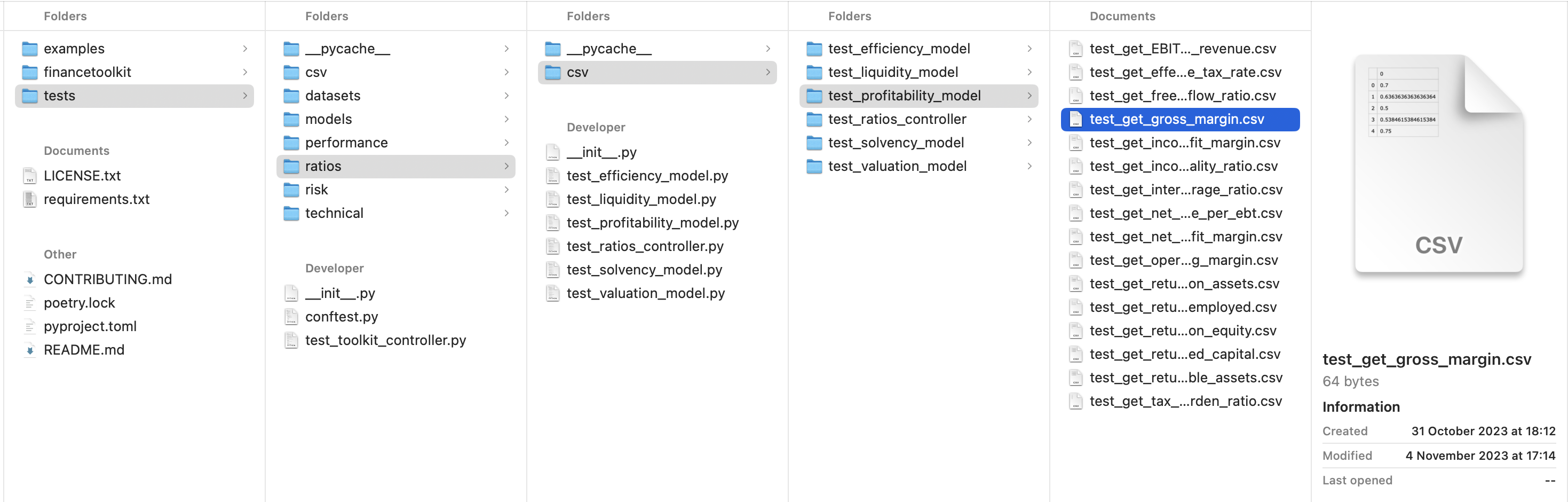
For example, changing the Gross Margin formula from (revenue - cost_of_goods_sold) / revenue to (revenue - cost_of_goods_sold) / revenue - 1 (which is incorrect) causes the test to fail and display the following error, showing the difference between the expected and actual results:
(base) FinanceToolkit % pytest tests/ratios/test_profitability_model.py
=========================== test session starts ========================================
platform darwin -- Python 3.10.9, pytest-7.1.2, pluggy-1.0.0
rootdir: /Users/jeroenbouma/Documents/FinanceToolkit, configfile: pyproject.toml
collected 16 items

tests/ratios/test_profitability_model.py .E...............

============================ ERRORS ====================================================
ERROR at teardown of test_get_gross_margin

self = <tests.conftest.Recorder object at 0x293678a60>

    def assert_equal(self):
        record_list = self.__record_list

        for record in record_list:
            if record.record_changed:
>               raise AssertionError(
                    "Change detected\n"
                    f"Record    : {record.record_path}\n"
                    f"Expected  : {record.recorded[:self.display_limit]}\n"
                    f"Actual    : {record.captured[:self.display_limit]}\n"
                )
E               AssertionError: Change detected
E               Expected  : ,0
E               0,0.7
E               1,0.6363636363636364
E               2,0.5
E               3,0.5384615384615384
E               4,0.75
E
E               Actual    : ,0
E               0,-0.30000000000000004
E               1,-0.36363636363636365
E               2,-0.5
E               3,-0.46153846153846156
E               4,-0.25

tests/conftest.py:226: AssertionError
================================ short test summary info ================================
ERROR tests/ratios/test_profitability_model.py::test_get_gross_margin - Change detected
================================ 16 passed, 1 error in 1.99s ============================